



The Risk Assessment Module in MasterQMS helps you identify, assess, and document both risks and opportunities within your management system. Gain a clear overview of risks, responsibilities, actions, and follow-up, while strengthening your documentation for ISO audits.
Can we help with your risk assessments?
Fill out the form, and we’ll contact you as soon as possible.
Risk assessment and risk management are about identifying, assessing, and managing the risks that may affect a company’s operations, quality, finances, or reputation. This is important because it helps the company work proactively, make better decisions, and reduce the likelihood of errors, losses, or unforeseen events.
MasterQMS includes a module developed specifically for this purpose. The module makes it easy to create risk assessments, register relevant risks, and gain a clear overview of where action is required. Users can see the level of risk, which actions are necessary, who is responsible, and how follow-up should be managed. This creates structure, visibility, and more effective day-to-day risk management.
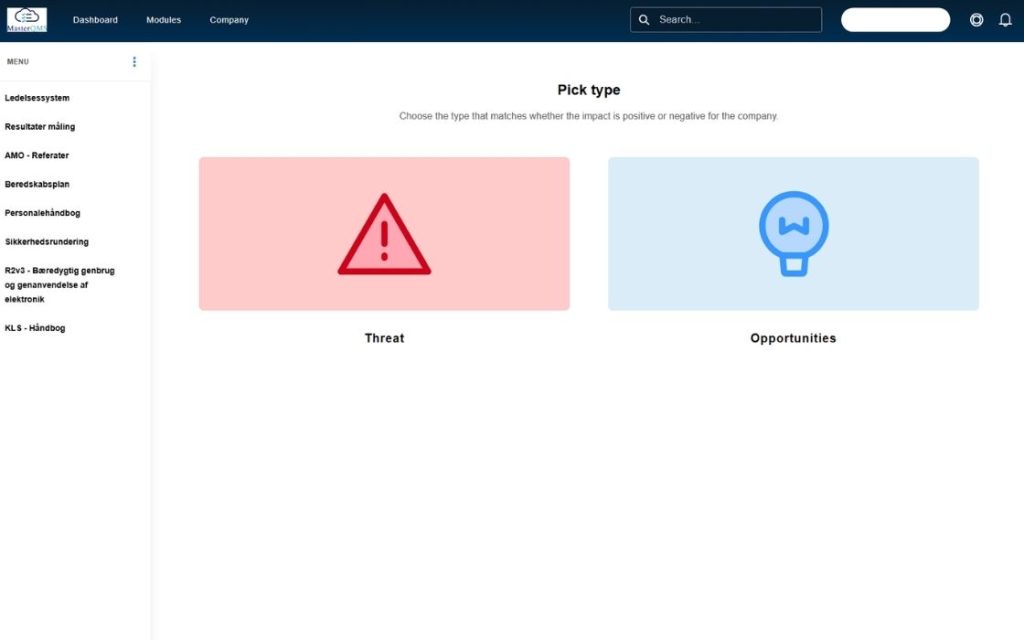
When you open the Risk Assessment Module, you first choose between Risk and Opportunity. Here, you indicate whether the case concerns an actual risk to the company or an opportunity that should be explored further.
If you select Risk, you create a risk assessment for an issue that may have a negative impact on areas such as quality, the environment, occupational health and safety, information security, or ISO certification.
If you select Opportunity, you create a case that is not necessarily a direct risk but may create value through improvement, optimization, or strengthening of the company’s processes.
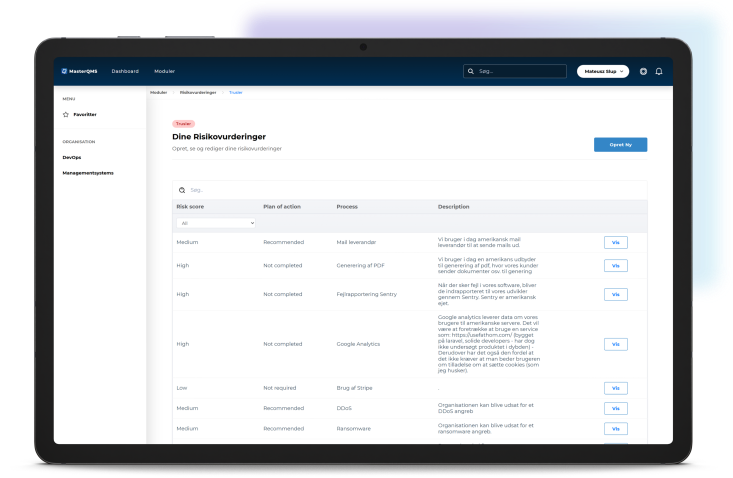
Once you have selected either Risk or Opportunity, you get a consolidated overview of the risk assessments that have already been created. Here, you can quickly see the key information for each assessment, making it easy to identify which cases require action or follow-up.
The overview includes information such as risk score, process name, description, action plan, responsible person, status, and follow-up.
From here, you can open an existing risk assessment to view more details, update the action plan, or delete the assessment if it is no longer relevant.
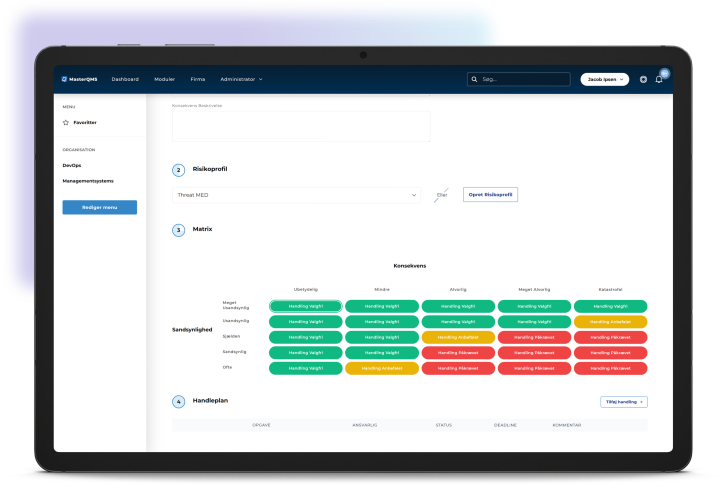
When creating a new risk assessment, you bring all relevant information together in one place. You first enter the process name, assign a responsible person, add a description of the case, and describe the potential consequence if the risk occurs. You then select a risk profile indicating whether the impact or need for action is low, medium, or high.
In the risk matrix, you then assess likelihood and consequence. This generates an overall risk score, making it easier to prioritize the case. Finally, you add an action plan describing what needs to be done, who is responsible, the current status of the action plan, and any relevant comments. Once the risk assessment has been created, it appears in the overview, where you can later update the status and follow up on the actions.
By switching to electronic document management, you ensure that all employees always have access to the latest and most up-to-date versions of your risk assessments. It also makes it easy to collect data across the entire organization – whether employees use a mobile phone, tablet, or computer – helping strengthen your overall compliance.
Systematic risk management is a key requirement in many ISO standards, including ISO 9001 for quality management, ISO 14001 for environmental management, and ISO 27001 for information security. Our Risk Management Module makes it easy to document, assess, and take action on risks, helping you stay prepared for your next audit and meet certification requirements.
Yes, very easily. In MasterQMS, you can build your own forms using an intuitive drag-and-drop interface. You can create visual layouts and configure dynamic logic so the form automatically adapts based on the information entered by employees.
Our visual risk matrix provides a quick and clear overview of the company’s overall risk profile. By grouping risks within the matrix, you create greater consistency in your assessments, making it significantly easier to prioritize actions and move directly from an identified risk to concrete action.
Ease of use is a key priority. The forms are fully optimized for both tablets and mobile phones. This means employees can quickly and efficiently enter and validate data directly in the field or on the production floor without having to return to a computer.
Are you ready to take the next step?
Fill out the form, and let’s talk about how our system can help your business thrive.
We demonstrate how our system creates value in your business — whether you want to implement certifications or document your processes to ensure effective governance.
Try our system FREE for 30 days and see how it can create value for your business.